top of page
  • White Facebook Icon
  • White Instagram Icon

Courses List

BattleBot design and engineering
CAD & 3D modeling
3D printing
Mechanical assembly
Motors and drive systems
Basic electronics and soldering
Radio control
Weapon systems and armor
Weight optimization
Robot testing and troubleshooting
Driving and battle strategy
Competition preparation
The Challenge
Students don’t simply build a robot—they test it, discover problems, repair it, and improve it.
DESIGN → BUILD → TEST → IMPROVE → COMPETE
Final Project
Each team completes a functional:
1-LB COMPETITION BATTLEBOT + COMPETITION

1-LB BATTLEBOT DESIGN & BUILD

Build It. Test It. Battle It!
Turn engineering into an exciting real-world challenge!
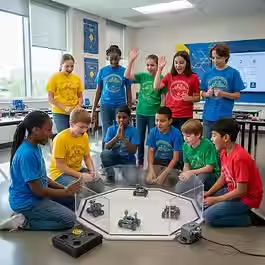
In this hands-on 10-class program, students will design, build, wire, test, and improve their 1-pound competition BattleBot.
Students experience the complete engineering process as they transform an idea into a real working robot

Learning Objectives
Understand basic programming logic and block-based coding.
Use sequences, events, loops, conditions, variables, and basic sensor commands.
Program movement, direction, speed, timing, and turns.
Test programs, identify errors, and debug code.
Apply computational thinking to creative and robotics challenges.
Explain how a program works and present a completed coding solution.
Three Coding Modules
Scratch — 3 Classes
Create animations and games while learning events, movement, loops, conditions, variables, and game logic.
Sphero Coding — 3 Classes
Take coding off the screen by programming a real robot. Students learn movement, direction, speed, turns, loops, and precision through physical challenges.
VEXcode VR — 3 Classes
Program a virtual robot to navigate courses, use sensors, react to obstacles, and complete a final robotics mission.
Every Class Includes a Project
Students learn by doing. Each lesson includes a coding project or challenge where students plan, code, test, debug, improve, and demonstrate their solution.

CODING & ROBOTICS FOUNDATIONS

Coding & Robotics Foundations introduces students to programming through hands-on, project-based activities. Students begin with visual block coding in Scratch, apply their programming skills to a real Sphero robot, and then solve virtual robotics challenges using VEXcode VR. Every class includes a coding project so students learn by creating, testing, debugging, and improving their programs. No previous coding experience is required.

Students will explore:
How 3D printing works
Additive vs. subtractive manufacturing
Parts and operation of a 3D printer
FDM technology and basic G-code concepts
3D printing materials: PLA
3D printer setup and bed leveling
Basic troubleshooting,
Slicing and print preparation
Bambu Studio, PrusaSlicer, and OrcaSlicer
Basic 3D modeling with Tinkercad 
How to find and prepare ready-to-print STL models
How AI can help transform 2D ideas into 3D models
Safe operation and proper filament handling.
The 3D Printing Journey
Throughout the course, students experience the complete process:
IDEA → DESIGN → SLICE → PREPARE → PRINT → TROUBLESHOOT → CREATE → PRESENT
Each student will work on hands-on activities and use an Engineering Notebook to document ideas, designs, decisions, challenges, and results.

3D Printing & Design – Level I

In this hands-on course, students discover the exciting world of 3D printing, digital design, and modern manufacturing. They will learn how a 3D printer works, explore different materials, prepare digital models, use slicing software, and transform their own ideas into real 3D-printed creations.
Students don’t just watch a printer work — they become young makers.

Discover the world of digital art! In this 10-lesson, hands-on course, middle school students learn the foundations of digital drawing and painting while creating landscapes, portraits, and original characters. Students work with drawing tablets and digital art software as they explore brushes, layers, color, textures, light and shadow, facial proportions, character design, and composition. Each class includes a practical project, allowing students to build their skills step by step and complete an original final digital illustration.
Perfect for students who love art, technology, creativity, and bringing their ideas to life digitally.
Core Skills: Digital drawing, brushes, layers, color, texture, landscapes, portraits, character design, lighting, and composition
Final Project: An original digital illustration presented in a student Digital Art Gallery

DIGITAL ART -Level I

Digital Art Level I is a hands-on introductory course designed for middle school students who want to learn how to draw and paint digitally. Students explore the essential tools of digital art while creating landscapes, portraits, and original characters. Through guided practice, they learn to use brushes, layers, color, texture, light, shadow, and composition to transform their ideas into finished digital artwork.

Painting and color
Drawing and basic composition
Play-Doh and modeling
Cardboard construction
Paper crafts and collages
Mixed projects
Creative building challenges

Creative Art & Craft Workshop

Traditional Art • Crafts • Play-Doh • Cardboard Projects
A fun, hands-on art program where children explore creativity through painting, crafts, modeling, cardboard construction.
Students learn by creating. Every class introduces material, technique, and project designed to develop imagination, fine motor skills, problem-solving, and artistic confidence.

STAY UPDATED

Tel: 786-618 3608     

Email: info@noahsteamark.com

  • White Facebook Icon
  • White Instagram Icon
bottom of page